What the Map Helps You Find
The quasimorph map helps you locate contracts and check travel time before choosing your next destination. If you need equipment or upgrade materials, use it to find available missions, then inspect each station's briefing for clues about its loot. That extra check can help you avoid choosing a food-heavy location when your priority is technology.
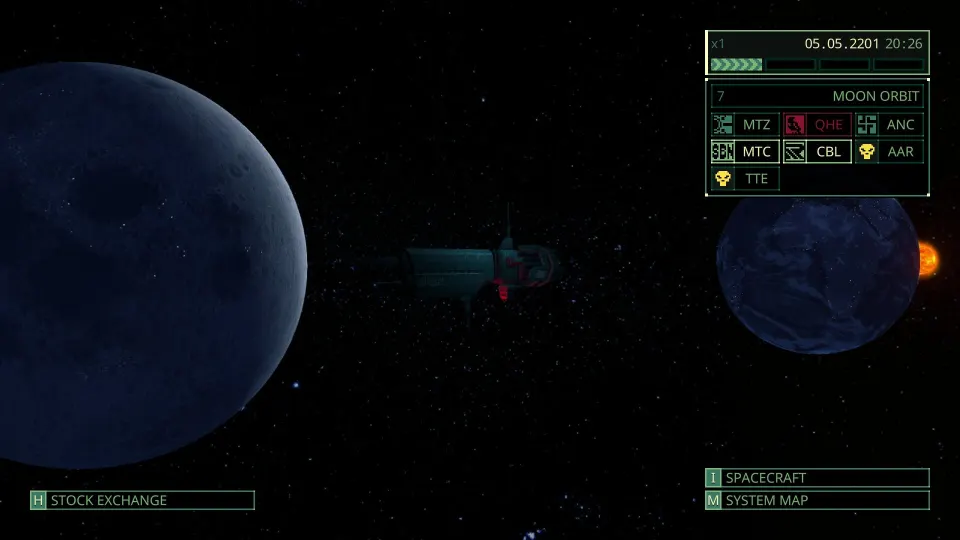
The Solar System map is the game's strategic navigation screen. It connects planets, satellites, and mission locations, while individual contracts provide more information about the operation awaiting your operative. The Solar System wiki page describes its central functions as showing available missions and travel times between destinations.
| Map or mission element | Information it provides | Practical use |
|---|---|---|
| Solar System map | Destinations and available missions | Compare opportunities across different areas |
| Travel information | Time needed to move between locations | Check the journey before committing |
| Local station entries | Locations that may have active contracts | Open a specific mission |
| Mission briefing | Objectives, participants, and station details | Evaluate the assignment and likely loot |
Think of destination selection as two decisions. First, identify a contract your current operative and equipment can handle. Then determine whether the station suits your item needs. A promising location is only useful if its mission is manageable enough to make the trip worthwhile.
Choosing Missions Before You Travel
Open a mission and check both its objective and the side you will support. Many conflicts offer opposing assignments, such as conquest and defense. These choices can change your employer, opponent, reward, and difficulty even though you are looking at the same location.
The 1.0 beginner walkthrough shows local mission locations highlighted with a light green border. Hovering over or selecting a location reveals the available work. Use that indication to find contracts, then read their details before choosing your operative.
| Mission detail | What to compare | Why it matters |
|---|---|---|
| Supporting and opposing factions | Who benefits and who you fight | Determines the relationship behind the contract |
| Difficulty rating | Ratings across available assignments | Provides a quick comparison of mission demands |
| Power concentration | Displayed strength for the selected side | Adds context about the opposition |
| Reward estimate | Value offered for each assignment | Helps weigh the return against the challenge |
A community mission-selection video emphasizes checking power concentration alongside the difficulty rating. Its numerical examples reflect that player's situation, so they should not become universal safety thresholds. Compare the available missions against your own equipment and experience.
Before setting off:
- Confirm your side. Check the employer and opposing faction after switching between assignments.
- Read the objective. A different assignment at the same station may ask for substantially different work.
- Compare the challenge. Consider difficulty and power concentration together.
- Inspect the station description. Look for production or activity details relevant to your item needs.
- Check travel time. Include the journey when comparing destinations.
Planets, Satellites, and Station Names
In version 1.0, the accessible Solar System extends outward to Saturn and its moons. Uranus, Neptune, Pluto, and more distant objects appear in game text but are not shown as accessible destinations in the wiki's 1.0 description.
Within an area, station names and abbreviations help distinguish individual locations. These examples come from the Solar System location directory:
| Area | Location type | Example stations and codes |
|---|---|---|
| Mercury | Planet | Flat Obsidian (FLO), Discovery RG (DRG), Caloris Planitia (CPL) |
| Vulcan | Artificial satellite orbiting Mercury | Rhino-4 (RHN), Kizzuwatna (KIZ), Lomonosov (LMN) |
| Citadel-1 | Artificial satellite orbiting Mercury | Gamma Hydra 4 (GHY), Energy One (ENO), Photosphere-17 (PHO) |
| Venus | Planet | L-BSA (BSA), Fortuna University (VFU), Feathered Temple (FTP) |
These are location examples, not a complete station list or a list of guaranteed farming spots. A recognizable station name helps you identify the destination, but you still need to inspect the active contract and local description.
For a first route, compare missions around Mars, Phobos, and Deimos. The 1.0 beginner walkthrough recommends staying in this region initially because it describes those locations as avoiding Quasimorphosis. That makes the area a useful starting point while you learn mission selection and equipment management.
This regional advantage does not remove ordinary combat difficulty. You still need to check the opposition and assignment. A demanding contract near Mars can remain a poor choice for an under-equipped operative, even without Quasimorphosis adding another complication.
Using Station Clues to Find Items
The most useful loot clue may be at the bottom of the mission briefing. In a community discussion about map drops, players recommend scrolling through the briefing to read facts about the station's local activity. Those details can suggest the kinds of goods worth looking for.
For example, a description mentioning luxury manufacturing suggests luxury-related items. This is a way to set expectations before deployment, not a guaranteed inventory. The discussion also describes noticeably different loot experiences between locations, including food-heavy areas and places with more military equipment.
| Item goal | Location clue to investigate | Evidence and limitation |
|---|---|---|
| Luxury-related goods | A briefing describing luxury production | Community advice; individual finds can vary |
| Welding machines | Factory stations | Recommended by the independent mission guide |
| Blueprint chips | Network Centre locations | Highlighted by the independent chip guide |
| Food supplies | Locations encountered as food-heavy | Player observation, not a universal drop rule |
The independent Quasimorph Mission Guide points players toward factory stations for welding machines and Network Centre searches for blueprint chips. These are useful starting directions when selecting a destination. They do not establish exact drop rates, guaranteed quantities, or an identical result from every mission.
Treat faction-based loot claims with more caution. The community discussion includes claims about differences between human enemies and Tezctlan forces, but it does not establish a complete drop table. Such reports can inform what you investigate; they are less reliable than a verified rule for a specific item.
For repeat runs, keep simple notes about the station, mission, opponent, and useful items recovered. Several observations can help you judge whether a location fits your needs. One unusually good or poor haul should not define the station permanently.
Version Differences and the Map Editor
Map coverage has expanded since Early Access. The official October 2023 roadmap and FAQ described four planets, three satellites, and 49 stations. Those figures belong to that release period and should not be used as the complete size of the 1.0 map.
Check version labels when following location or farming advice. The independent mission guide separates Steam 1.0 information from Unstable Beta information. That distinction matters when comparing navigation details, mission availability, or recommendations written for different builds.
The developer also announced a Map Editor on April 11, 2026, stating that modders could access it through Steam's beta branch. This announcement concerns creating maps, rather than choosing destinations on the campaign's Solar System screen.
The announcement establishes beta access at that time. It does not establish the editor's current stable-branch availability or provide a complete editing workflow. Players seeking ordinary contracts can continue using the campaign map without treating the editor as part of mission selection.
FAQ
What does the quasimorph map show?
The Solar System map shows destinations, available missions, and travel information. Selecting a local mission lets you inspect its assignment. For item hunting, follow that selection by reading the station description for clues about local production and likely goods.
Where should a beginner look for missions?
Start by comparing Mars, Phobos, and Deimos. The 1.0 beginner walkthrough recommends this region to avoid Quasimorphosis while learning. Still check each contract's difficulty, opposing faction, and power concentration before choosing it.
Can a station name tell me exactly what will drop?
A name alone is not a dependable loot table. Read the station details at the end of the briefing. Descriptions of manufacturing or other local activity can suggest useful item categories, but they do not guarantee a particular find.
Which locations are worth checking for upgrade items?
Factory stations are recommended for welding machines, while Network Centre locations are highlighted for blueprint chips by the independent mission guide. Use these suggestions to narrow your search, then compare the available contracts before traveling.
Why do older guides show fewer destinations?
They may describe an earlier build. The 2023 Early Access announcement listed a smaller set of planets, satellites, and stations, while the 1.0 wiki describes accessible locations extending to Saturn and its moons. Match a guide's version to the game you are playing.